

Lowes receipt template 2
Customize this other template in DocDesk—edit every field, then download as JPG or PDF.
About this template
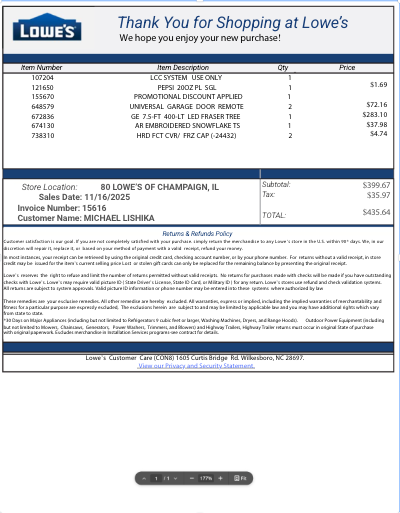
Create a Lowes 2 receipt with our receipt generator. Select the Lowes receipt template 2 from the template library. Edit and customize the receipt. Instantly save and download your customized receipt.
What are the reasons you might need a receipt from Lowes?
-
To return or exchange an item purchased in-store or online — especially important for home improvement tools, appliances, and garden products.
-
To obtain maximum resale value on unopened or new items on secondary marketplaces or consignment shops (e.g. power tools, lighting fixtures).
-
To verify purchase date for warranty claims on appliances, electronics, or power tools.
-
For tax documentation if the purchase was business-related (e.g. contractor, landscaping, remodeling).
-
To track purchases for home improvement budgets or insurance claims.
-
For rebate eligibility, as some manufacturer rebates require proof of purchase.
What products are made by Lowes and where are they sold?
-
Lowe’s primarily sells products from other brands, but also offers several exclusive and private label brands, including:
-
Kobalt (tools and equipment)
-
Project Source (lighting, faucets, home goods)
-
Allen + Roth (home décor and furnishings)
-
Portfolio (lighting)
-
-
These products are sold:
-
In Lowe’s stores across the US and Canada
-
Online at www.lowes.com
-
What is the return policy without a receipt at Lowes?
-
Lowe’s can often look up purchases made by credit/debit card, MyLowe’s account, or phone number, but without a receipt, returns may be subject to:
-
Refund or exchange at the current selling price
-
Refunds issued as store credit rather than cash
-
Some exclusions apply (e.g. major appliances, special orders)
-
-
A valid photo ID is usually required for no-receipt returns.
How can I get a duplicate receipt from Lowes?
-
For purchases made with a credit/debit card, Lowe’s can typically look up the transaction in-store by swiping the card or entering card details.
-
If you used a MyLowe’s account, log into your account online and view past purchases and receipts.
-
For online orders, check your email for the order confirmation or log into your MyLowe’s account to reprint receipts.
-
Contact the store where you made the purchase with transaction details (date, amount, payment method).
Briefly tell me what elements are on a receipt and any additional interesting features of a Lowes receipt.
-
A typical Lowe’s receipt includes:
-
Lowe’s logo and store information
-
Date and time of purchase
-
Transaction number or receipt number
-
List of items purchased, including SKU, description, quantity, price
-
Subtotal, tax, and total amount
-
Payment method (cash, card, gift card)
-
Return policy statement on the bottom
-
-
Interesting features:
-
Some receipts include a QR code for returns or warranty lookups.
-
Purchases linked to a MyLowe’s card may show points or purchase history details.
-
Large-item purchases (appliances, lumber) may have additional delivery or installation notes printed.
-